
Here’s the rundown of how our current news section works. There’s an exception to the 8am News in that it doesn’t contain a Sports Update, since it’s recorded at 8:30am each weekday.
We’ll break this down in a series of different ways, but we all agree that the actual process is very intuitive in practice, far more than we’ve described it below.
Here’s how our News segments look in Myriad:
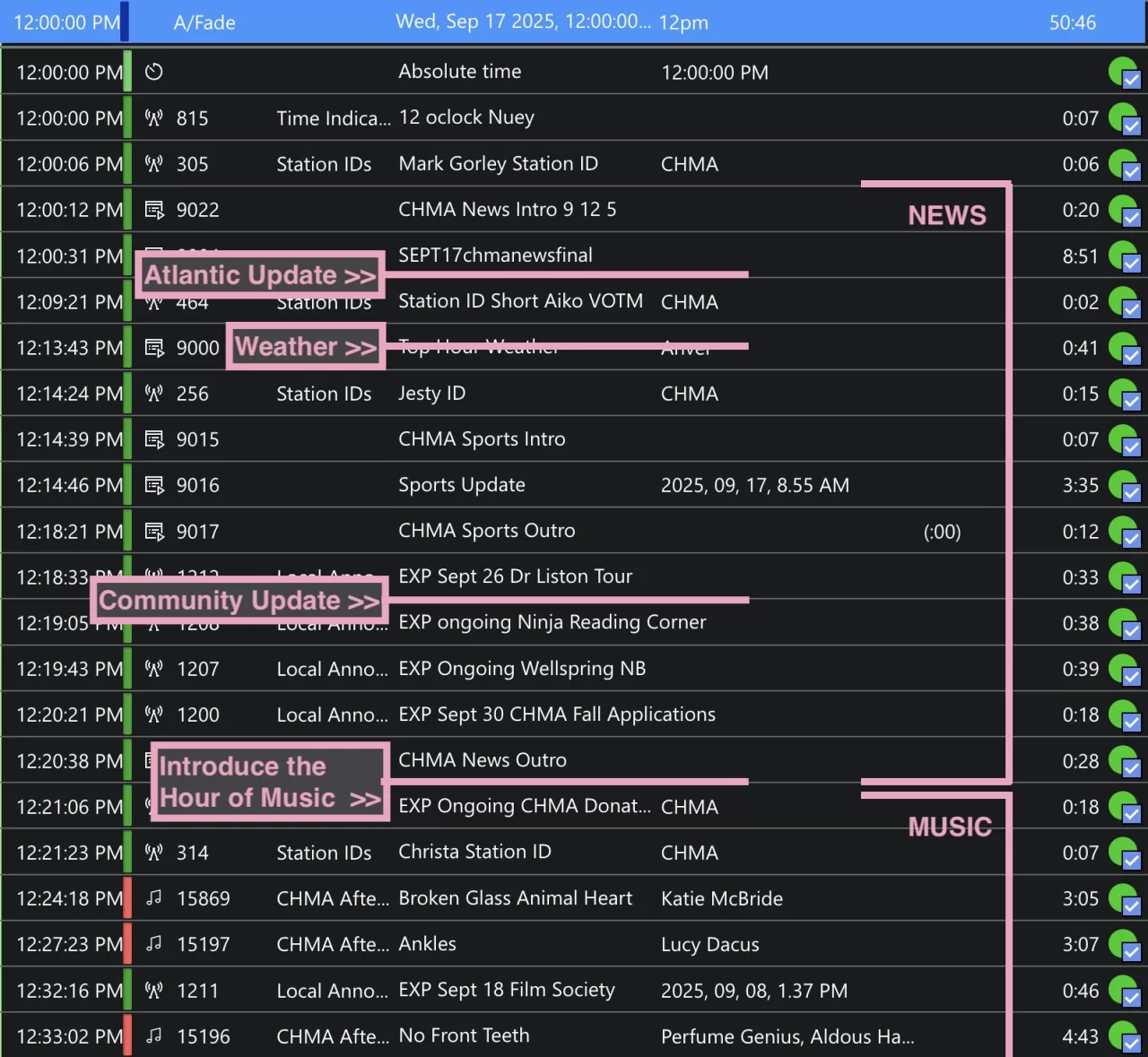
For Quick Reference, here’s the segment run and when you should jump in:
1) Myriad – Time Indicator
2) Myriad – Local News
3) You! – Atlantic Update
4) Myriad – Station ID
5) Myriad/You! – Weather (If it’s there, if not: You!)
6) Myriad – Station ID
7) Myriad – Sports Intro – Sports Update – Sports Outro
8) You! – Community Update (local announcements and Town social media updates)
9) Myriad – News Outro
10) You! – Music Intro and what’s coming up in the hour.
11) Myriad – 2 Songs
12) Vibe out! Talk about the songs and read local announcements.
When preparing for hosting the News Hours, it’s suggested to have yourself organized for a seamless flow. Here are the windows/tab you should have ready atleast 10 minutes before the top of the hour.
1) Environment Canada Sackville Weather
2) CHMA Newswire (from the Canadian Press). We’ll send you the password.
3) the Municipality of Tantramar’s Social Media page (either Instagram or Facebook). These may not work on a public computer.
4) the CHMA Community Events Page here. It’s suggest to open three to four events in their own tabs. This will make it quicker to call up when reading.
You should always check what’s populated in your hour. After the News Outro you should remove all Local Announcements and Station IDs from the Myriad log. Those are there in case you didn’t show up.
You can also preview the tunes and replace them as you feel works. If you see a song that’s been overplayed, put it to rest.
——–
Our News run starts at the top of the hour sharp, with a quick time indicator:
“The time is now 12 o’clock and you’re listening to CHMA 106.9 FM in Sackville, New Brunswick”
Once the time is passed the hour, you should switch Myriad into “Live” mode. This will enable you to stop and start the sequences.
A News Intro will play after that.
Directly after the News Intro the Local News will play. This is best delineated as Media Item 9004, as the journalist don’t use a standard to name their file.
While the Local News is playing you should press the green circle so that it’s a red square, which would indicate Myriad to stop after the local news ends.
You’ll want to have the newswire ready to read and be prepared to switch windows 20 seconds before the local news ends. You should be on the mic and introducing the Atlantic Update as the local news fades out.
“This is your CHMA Atlantic Update for Tuesday, September 16th….”
and read the news straight, as presented. You do not need to read the information in [ ]’s.
as you complete the Atlantic update you’ll want to press Go (the Green Play button) to play the Station ID next in the sequence. You’ll also press the green circle on the Station ID to stop after it plays. This will give you a moment to catch a breath and ready for the Weather window.
As that Station ID ends you’ll read the weather “…and here’s your CHMA weather for this week…”
As you complete the weather you’ll ready the mouse to press the Go button again to advance to the Sports Update Intro. Let the Sports Intro, Sports Update and Sports Outro play.
Switch the Sports Outro to stop after the Outro plays.
Once the Sports Outro stops you’ll want to do a Community Update with information from the Municipality, such as road closures and other information community info. You can also reference the CHMA Community Events Calendar, but please check the Tantramar social media in case of urgent updates.
You can then choose to play a CHMA local announcement that is populated or continue with the News Outro.
Once the News Outro plays, you’re expected to jump in to introduce the music and continue through the remained hour with local announcements from the CHMA Community Events Calendar or other sources. Be sure to check the #Day-time-hosts Slack channel for timely updates.
We expect hosts to introduce and backfill every two songs, but it’s also important to note the flow of the music, sometimes three, sometimes one.
Please do more than simply introduce the songs. Talk about atleast two of the songs within the hour. A quick wiki search can generate a lot of wonderful stories that helps our listeners know more about the artists. We work very hard to make sure the tunes are choice picks and rely on hosts to help express that.